
Toward the end of 2025, some of our WordPress websites started getting hammered by bot traffic. After months of effort, we’re finally starting to get back down to normal traffic numbers… for now. Every website is different, so I would not recommend blindly copying firewall rules or blocking entire IP ranges without reviewing your own traffic first. These changes were based on the patterns I observed across the affected sites.
This post breaks down what happened, how the traffic affected the websites, and the layered security changes I used to reduce the problem. The main tools included WP Engine firewall rules, Wordfence, rate limiting, IP range blocking, XML-RPC hardening, and changing default WordPress login URLs.
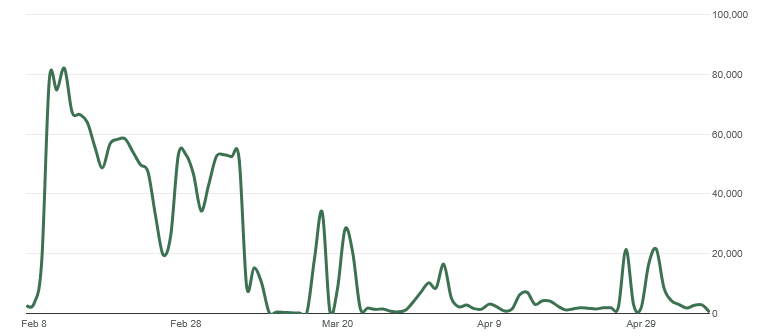
At first, we did not notice much from the front end of the site. The pages were still loading, the websites looked normal, and there was no obvious sign that anything major was wrong. The first major clue showed up in Google Analytics.
Our traffic data was getting demolished by direct traffic from China.
The numbers started skyrocketing, but not in a useful way. It was not real audience growth, better engagement, or a successful campaign. It was bot activity, and it was skewing the analytics so badly that Chinese traffic was making up almost all of the reported traffic.
Then the problem became more serious.
The First Major Problem: Bots Crawling HubSpot Links Endlessly
One of the first big issues came from bots crawling dynamically generated HubSpot links over and over again.
These were not normal user visits. The bots were repeatedly hitting generated URLs and creating enough server load that the WordPress site eventually went offline one evening around 5 or 6 p.m.
I ended up working on it late into the night.
The immediate fix was to add custom firewall rules inside the WP Engine dashboard. The goal was to stop the abusive dynamically generated HubSpot URL patterns before they continued hammering the server.
That got the site back online.
But it did not fully solve the problem.
It solved the emergency. It did not stop the larger bot traffic issue.
The Bigger Problem: Months of Bot Traffic
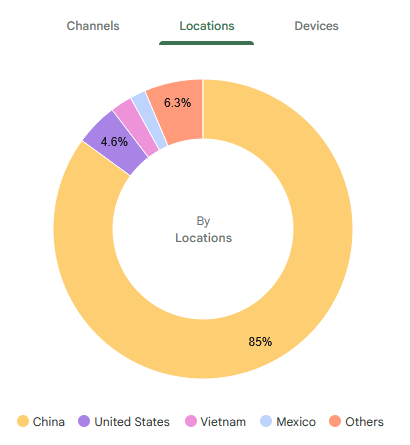
After the site came back online, the bots kept hitting us for months.
The traffic continued to show up heavily in Google Analytics, and the data became almost useless for normal reporting. When direct traffic from China is making up the overwhelming majority of visits, it becomes difficult to understand what real users are doing.
This created a few problems at once:
- The server was under unnecessary load.
- Google Analytics data became heavily skewed.
- Real engagement numbers were harder to trust.
- Security concerns increased.
- More time had to be spent monitoring traffic instead of building and improving the websites.
- Hosting resources had to be reviewed because the volume of junk traffic was no longer harmless.
Eventually, the traffic volume was high enough that we had to upgrade the WP Engine server.
That is when the issue became more than just annoying. Bot traffic was now creating real operational cost and technical overhead.
Bot Traffic Is Not Just a Security Problem
One thing I learned from this experience is that bot traffic can cause several different problems at the same time.
It can affect performance. It can create server strain. It can pollute analytics. It can make traffic reports harder to trust. It can also reveal security concerns when bots start probing for sensitive files, login pages, configuration paths, and other common vulnerability targets.
In other words, this was not just a random analytics issue.
It became a website performance, security, reporting, and hosting problem all at once.
What I Saw in Wordfence Live Traffic
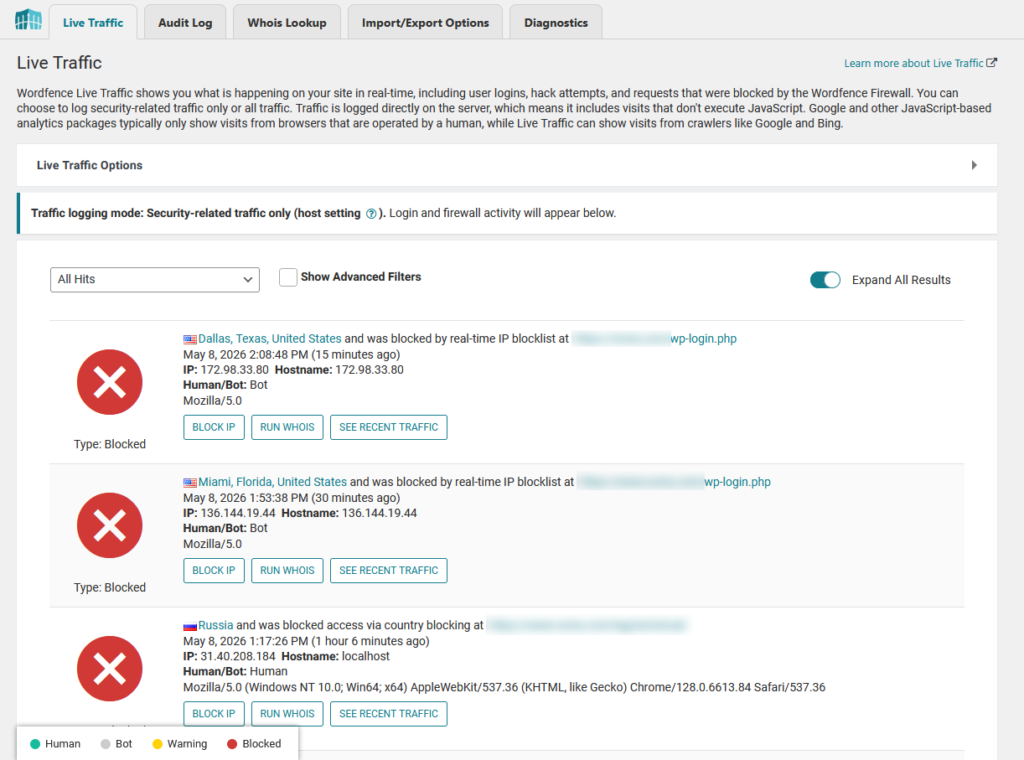
After installing and configuring Wordfence, I started reviewing Live Traffic more closely.
That is where the behavior became more obvious.
Many of the bots were not behaving like normal visitors. They were rapidly crawling the sites, hitting unusual paths, probing for files, and trying to access anything that could potentially expose a vulnerability.
Some requests looked like automated scans for environment files, configuration variables, login endpoints, old plugin paths, and other common WordPress attack targets.
That helped confirm that this was not just a harmless crawler indexing pages. A lot of it looked like automated vulnerability scanning mixed with aggressive bot crawling.
Building a Layered Firewall Strategy
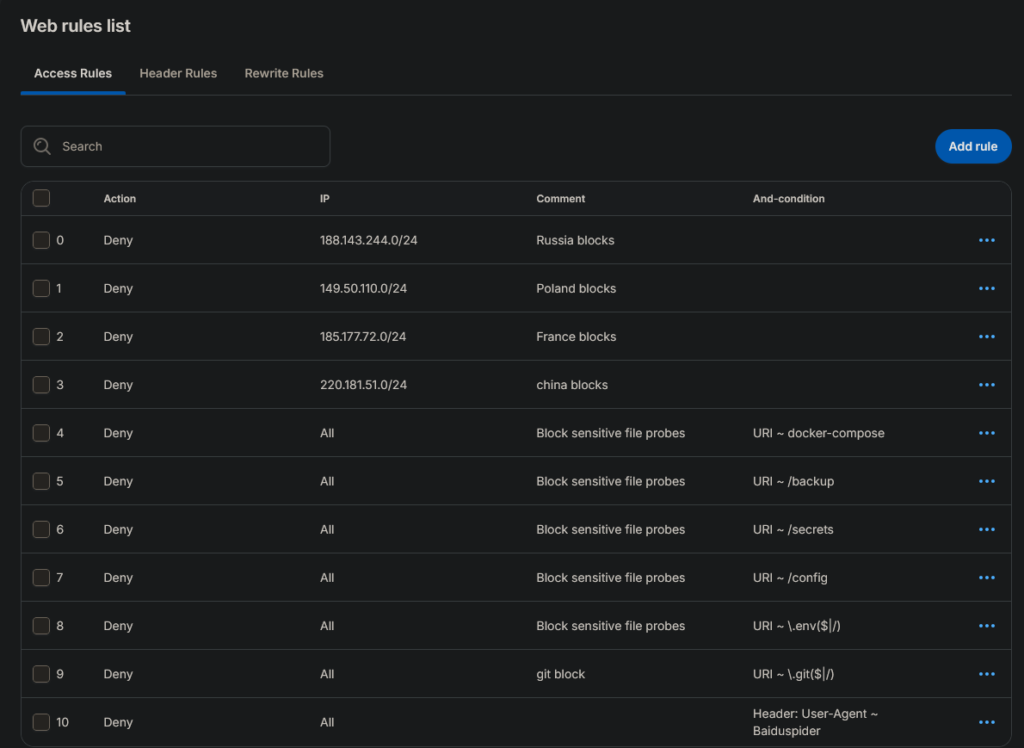
WP Engine Firewall Rules Added
- Blocked Russian IP range
Added a deny rule for188.143.244.0/24after suspicious traffic patterns were detected from that range. - Blocked Polish IP range
Added a deny rule for149.50.110.0/24to stop repeated unwanted bot activity. - Blocked French IP range
Added a deny rule for185.177.72.0/24after identifying abusive or suspicious traffic from that subnet. - Blocked Chinese IP range
Added a deny rule for220.181.51.0/24, which was part of the broader effort to reduce high-volume bot traffic and analytics pollution. - Blocked Docker Compose probes
Denied requests containingdocker-composeto prevent bots from looking for exposed deployment or configuration files. - Blocked backup file probes
Denied requests containing/backupbecause bots commonly scan for backup folders, old files, and leaked site archives. - Blocked secrets path probes
Denied requests containing/secretsto stop automated scans looking for sensitive credentials or private configuration data. - Blocked config path probes
Denied requests containing/configbecause bots often search for exposed configuration files. - Blocked
.envfile probes
Denied requests matching.envbecause environment files can contain database credentials, API keys, and other sensitive values. - Blocked
.gitpath probes
Denied requests matching.gitto prevent bots from trying to access Git repository metadata or source control files. - Blocked Baiduspider user agent
Added a header-based deny rule for theBaiduspideruser agent to reduce unwanted crawler activity from that bot.
The biggest lesson from this experience is that one tool usually is not enough.
I started building a layered protection setup.
The first layer was the WP Engine firewall. This helped block traffic earlier at the hosting and platform level before every request had to be handled directly by WordPress.
The second layer was Wordfence, which gave me deeper WordPress-level visibility and control.
The setup looked something like this:
Layer 1: WP Engine firewall rules
Custom firewall rules, subnet blocks, IP range blocks, and URL pattern denial.
Layer 2: Wordfence security plugin
Live traffic review, rate limiting, IP blocking, bot detection, and WordPress-level firewall protection.
This layered approach helped because the most abusive traffic could be stopped before it created more load inside WordPress, while Wordfence still gave me detailed visibility into what was actually happening.
What I Changed in WP Engine
Inside WP Engine, I worked on blocking abusive patterns and reducing unnecessary bot access.
Some of the main steps included:
- Adding custom firewall rules
- Blocking suspicious URL patterns
- Blocking dynamically generated HubSpot link abuse
- Adding IP range and subnet bans
- Reviewing traffic behavior over time
- Adjusting rules as new patterns appeared
- Disabling or restricting unnecessary WordPress access points where possible
- Prioritizing firewall rules so the most important blocks happened first
This helped reduce the amount of junk traffic that reached the site directly.
The important part was not just blocking one IP address or one URL. It was identifying repeated patterns and blocking those patterns earlier in the request flow.
What I Changed in Wordfence
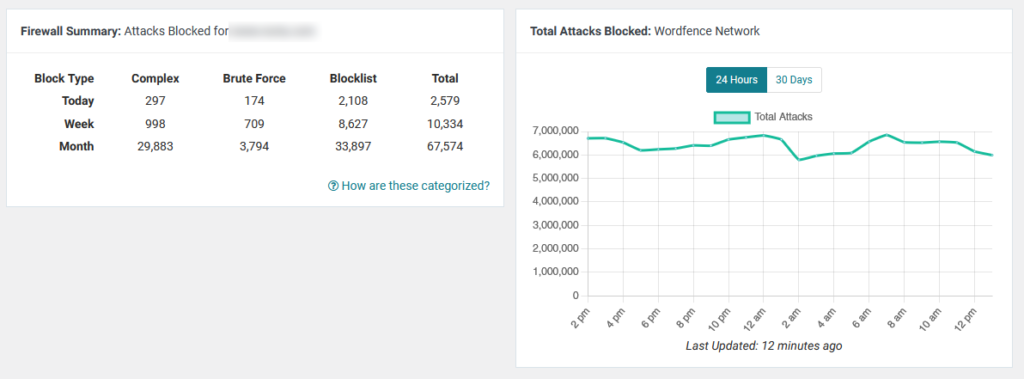
Wordfence became useful because it showed what the bots were actually doing.
Through Wordfence Live Traffic, I could see that many bots were rapidly crawling the websites and probing for anything that might expose a vulnerability.
Inside Wordfence, I worked on:
- Enabling and tuning the firewall
- Reviewing Live Traffic
- Adding rate limiting
- Blocking abusive IPs
- Watching repeated request patterns
- Reviewing country and IP behavior
- Tightening bot protection
- Monitoring vulnerability-style scanning attempts
- Adjusting settings as new patterns appeared
This helped turn the problem from a mystery into something I could actually analyze and respond to.
Hardening Common WordPress Entry Points
Another major part of the work was hardening common WordPress entry points.
Bots know the default WordPress playbook. They know to look for common login paths, XML-RPC, plugin paths, configuration files, and other predictable URLs.
So I started removing or reducing access to the obvious targets wherever possible.
Disabling XML-RPC
One of the hardening steps was disabling XML-RPC.
XML-RPC is an older WordPress feature that can still be useful in some cases, but it is also commonly abused by bots. If a site does not need it, disabling it can remove one more attack surface.
This was not the only fix, but it was part of the larger hardening process.
Changing the Default WordPress Login URL
Another step I took was changing the default WordPress login URL.
By default, WordPress login pages are easy for bots to find. Most automated scanners already know to check paths like:
/wp-login.php
/wp-admin/
Once they find those URLs, they can start hammering the login page with brute-force attempts, fake login requests, or other automated probing.
Changing the login URL is not a complete security solution by itself, but it helps reduce low-effort automated traffic. It removes one of the most obvious WordPress entry points from the default bot playbook.
This was part of the larger hardening process:
- Change the default login URL
- Disable XML-RPC
- Add Wordfence rate limiting
- Monitor Live Traffic
- Block suspicious IPs and ranges
- Add WP Engine firewall rules
- Deny abusive URL patterns before they hit WordPress
The main goal was to reduce unnecessary bot access points and make the sites less predictable to automated scanners.
Blocking IP Ranges Instead of Playing Whack-a-Mole
At first, it can be tempting to block individual IP addresses one by one.
That only gets you so far.
A lot of bot traffic rotates through different IPs, related ranges, or networks. Blocking one address might stop one bot for a few minutes, but then another one appears from a nearby range.
So I started using broader IP range and subnet blocks when the patterns were clear enough.
This has to be done carefully. You do not want to accidentally block legitimate traffic. But when the behavior is obvious and repeated, broader blocking can be much more effective than chasing individual IPs forever.
The Google Analytics Problem
One of the most frustrating parts of this issue was what it did to Google Analytics.
The site traffic numbers looked massive, but they were not meaningful. When most of the traffic is coming from suspicious direct visits, it becomes harder to answer basic questions like:
- How many real users visited the site?
- Which pages are actually performing?
- Are campaigns working?
- What countries are real visitors coming from?
- Is engagement improving or getting worse?
Bad bot traffic does not just create security and performance problems. It pollutes the data you use to make decisions.
That was one of the biggest reasons this needed to be fixed.
Why This Matters for Business Websites
For a personal blog, bad analytics are annoying.
For a business website, bad analytics can create real problems.
If the traffic data is polluted, you cannot easily tell what is working. You cannot confidently measure campaigns. You cannot trust location data. You cannot judge user behavior accurately. You also risk overlooking real performance issues because the reports are buried under junk traffic.
The same thing applies to hosting resources.
If bots are hammering the site all day, that traffic can increase server load, trigger performance problems, and potentially force infrastructure upgrades that should not have been necessary for real user traffic.
That is why bot mitigation became a priority.
The Results
After several months of work, the bot traffic finally started to taper off.
It did not happen overnight. There was not one magic setting that fixed everything.
The improvement came from layering multiple defenses:
- WP Engine firewall rules
- Wordfence firewall configuration
- Rate limiting
- IP range blocking
- URL pattern blocking
- XML-RPC hardening
- Custom WordPress login URL hardening
- Ongoing traffic review
- Adjusting rules as new patterns appeared
The sites are still getting hit, but the traffic is much more controlled than it was at the peak.
The biggest improvement was that the situation became manageable. The sites were more protected, the server was not being hammered the same way, and the analytics started to become more useful again.
Future Options if the Problem Persists
The current layered setup has helped reduce the bot traffic, but this kind of problem may not disappear completely.
If the traffic ramps back up or starts creating server strain again, the next step would likely be using a dedicated edge security service such as Cloudflare, Akamai, Fastly, Sucuri, Imperva, or a similar platform.
These services can filter traffic before it reaches WordPress or the hosting provider. They can add stronger bot management, DDoS protection, rate limiting, web application firewall rules, caching, and country-based traffic controls.
The downside is cost and complexity.
Advanced bot management and enterprise-level traffic filtering can become expensive, especially across multiple websites. These tools also require careful setup, DNS changes, rule testing, caching configuration, and ongoing monitoring to avoid blocking real users.
For now, the layered approach using WP Engine firewall rules, Wordfence, rate limiting, login hardening, XML-RPC hardening, and IP range blocking has made the issue more manageable. But if the traffic increases again, an edge security service would be the next logical step.
What I Learned
The biggest lesson is that bot traffic is not always obvious at first.
Sometimes your site still appears to work normally while your analytics are getting destroyed in the background. Other times, the bots find a specific type of URL and hammer it until the server starts struggling.
I also learned that a lot of automated bot traffic is not random. There are patterns. Bots look for predictable paths, default WordPress URLs, exposed configuration files, old plugin routes, login pages, XML-RPC, and any URL structure they can abuse.
For WordPress sites, especially business websites, security and traffic monitoring need to be treated as ongoing maintenance.
You cannot just launch the site, install a plugin, and assume everything is fine forever.
What I Recommend for Other WordPress Site Owners
If your WordPress site starts seeing suspicious traffic spikes, especially from countries or sources that do not match your real audience, do not ignore it.
Start by checking:
- Google Analytics traffic sources
- Hosting analytics
- Server logs if available
- Wordfence Live Traffic
- Repeated URL patterns
- Suspicious user agents
- Requests for config files or unknown paths
- XML-RPC activity
- Sudden direct traffic spikes
- Login page activity
- Repeated hits from the same IP ranges
Then take a layered approach.
Use your host-level firewall if available. Use a WordPress security plugin like Wordfence for visibility and additional protection. Add rate limiting. Block obvious abusive patterns. Disable features you do not need. Change predictable default access points where appropriate. Keep watching the traffic after each change.
The goal is not to block every bot on the internet.
The goal is to reduce abusive traffic, protect the server, preserve useful analytics data, and make sure real users can access the site without issues.
Final Thoughts
AI crawlers, scrapers, vulnerability scanners, and automated bots are not going away.
If anything, this kind of traffic is probably going to become more common.
For me, the solution was not one setting or one plugin. It was a layered process of monitoring, blocking, testing, adjusting, and hardening the websites over time.
It took months, but the traffic finally started to taper off.
That experience changed how I think about WordPress maintenance. Performance, security, analytics, and bot mitigation are all connected now. If bots are hammering your site, they are not just creating noise. They can affect your hosting costs, your reporting, your uptime, and your ability to understand what real users are doing.
For any serious WordPress website, bot mitigation is no longer optional maintenance. It is part of keeping the site stable, secure, and useful.



Leave a Reply